

Feedback and improvement suggestions for discuss.daml.com
First of all, great work! Thank you for pushing this forward.
While browsing through discourse, there were a few low priority things I have noticed that you might want to improve. It’s really nit picky stuff, but here it goes. I’ll add more things if and when I encounter them.
See Images (as a new user I can add only one picture per post  )
)


Thanks for the feedback. Made all these improvements except for the one where the topic text is clickable, will need to investigate that one more to see if it’s possible to change from the web interface (only allows adding CSS and html before/after <body>).
Cool, thanks for the quick reaction. In my opinion it looks neater now!
I’ll just continue being nit-picky. Feel free to ignore my remarks 
-
Increase the padding between “A”-DAML Logo and the title of the topic you’re in. It is still very small. See the top left corner of the second image with feedback above.
-
Make the initial header height when you enter a thread larger. Otherwise, when you scrolling down, and the transition to the smaller “A”-DAML Logo+Topic title happens, the header jumps in size.
-
I suggest removing the part of the description of the
Generalcategory where it says “Introduce yourself, …”. This clashes with theIntroduce yourselfcategory.
Cheers, and thanks for the great work!
Made some changes:
-
Added, misunderstood what you meant by padding (see point 2). Added more space between the A and the title.
-
I intentionally made the navbar larger when scrolling because it made the tags feel less crowded. I actually like the smaller navbar when it’s not needed and the larger one when scrolling so I’ve left it for now but added an animated transition so it looks cleaner. If others dislike it then I’ll be overruled and we can change it

- Fixed, thank you!

Nice catch, done!
Based on Java Bindings do not have all Ledger API services, is there a way we could enable line numbers on code samples?
Also, could you change the description of the Questions channel? because right now it’s only about DAML … so my “how to config syntax highlighting” question doesn’t actually fit.
@Gary_Verhaegen Working on it but the way the highlighting plugin structures the html is a bit odd so googling some CSS stuff.
EDIT: Getting closer but some lines have the counter flowing to the wrong spot, CSS experts needed
pre code .line::before {
    content: attr(index);
    display:inline-block;
    color: #999;
    margin-right: 10px;
    float: left;
}
BUG: 
@Darko Revised the description slightly to be more clear:

@anthony Doesn’t the code highlighting plugin have an option to output line numbers? It looks like it renders a series of elements with fixed offsets, and sometimes two lines have the same vertical offset. See the example below: the if (args.length < 3) { line has the same vertical offset as the System.err.println("Usage... line (where the content of the second line starts with a line break). I don’t think this can be fixed by CSS alone.

The say their highlighter lays the code out, many lines actually start in the line above with a line break, as @Robert_Autenrieth points out. The trick is thus to use ::after, not ::before. float: left is a bit hard to control , but I was successful using positioning:
Add a generous padding-left : 3.5em and position: relative to the enclosing code element to make space for the line numbers and mark it as a positional anchor. Then position the ::after element absolutely:
text-line.line::after {
    content: attr(index);
    display: inline;
    color: #999;
    margin-right: 10px;
    position: absolute;
    left: 5px;
}
As added bonus, you can give the ::after elements a background:
text-line.line::after {
    content: attr(index);
    display: inline;
    color: #ccc;
    position: absolute;
    left: 5px;
    background: #777;
    width: 2.5em;
    height: 3em;
    padding-left: 5px;
}
To make that behave nicely at the end of the block, add
text-line.line:last-child::after {
    height: initial;
}
The end result is rather nice IMO:

An alternative might be https://wcoder.github.io/highlightjs-line-numbers.js/
Thanks for the help both, will try @bernhard’s solution and confirm.
For some background, @Robert_Autenrieth that’s actually done by lining.js, not the code highlighter (highlight.js). The highlight.js maintainer actually refuses to add line numbering
@bernhard the highlightjs-line-numbers.js looks for an hljs object to hook into and Discourse hides it so that became a bit of a headache and was probably going to require modifying that script.
@bernhard this is rendering weird for me, line numbers are staying static (ie not moving when scrolling), and appear to be outside of the code block. This is on Chrome.

Using:
text-line.line::after {
    content: attr(index);
    display: inline;
    color: #ccc;
    position: absolute;
    left: 5px;
    background: #777;
    width: 2.5em;
    height: 3em;
    padding-left: 5px;
    font-style: normal;
}

text-line.line:last-child::after {
    height: initial;
}
I think you may be missing
pre>code.hsjs {
    position: relative;
    padding-left: 3.5em;
}
@anthony edited the above to make it less hacky. Better to have a more specific selector than using important!
Perfect, thank you.

Sweet, the code snippets with the line numbers are looking really good! like it a lot!
 cocreature:
The indentation in code snippets is a bit confusing!
@cocreature That’s a caching issue. After hard refresh it should look like this:

The line numbers don’t seem to work at all for me in Firefox even after clearing the cache. They work just fine in Chrome however. I don’t see anything useful in the console.
Good catch. It also doesn’t work on the system browser on Android. Again on Chrome mobile it works.
@anthony the DOM for highlighted code looks quite different in FIrefox compared to Chrome. Any idea what’s going on there? Is some piece of javascript (like linging.js) not doing its job in FF?
I notice that in FF the code block sometimes has attribute data-lining='' and sometimes data-lining='end'. With end it works, without, it doesn’t. Where is that attribute coming from? Can we influence how it’s set to make sure it always has end?
Thanks, hopefully fixed, Chrome and FF seem to have different orders of operations when rendering pages so I now have the monkey-patching for data-lining in two places and hopefully this stays consistent.
Please clear your caches and hard reload to try again. Thanks for reporting @cocreature
EDIT: Hrmm…still broken for me on mobile, will need to look at more.
It is also broken for me on desktop in firefox 75 (I did clear the cache).
I think the important thing will be to set data-lining='end' before lining.js is loaded. <script> tags in the HTML are guaranteed to be executed in order in all browsers, I believe.

Hey @anthony. I really like the code lines. Unfortunately sometimes it’s still a bit buggy, like in this screenshot:

from Stefano’s question here:
I have a couple of templates that share a field name (in this case name) template DivulgeableAsset with owner: Party name: Text where signatory owner -- choices... template PrivateAsset with owner: Party name: Text where signatory owner -- choices... Later, in DAML Script, I would like to retrieve contracts that instantiate these templates and extract their respective names. I do something like the following: run : Script () run = do owner <- fromS…
No usage of CSS will go unpunished.
Just to confirm you mean the blank spaces right? Will take a look.
Yeah, between line 7 and 8 in the first block, and between 4 and 5 in the second block

Thanks a ton.
However I’m surprised that you decided not to number the empty lines as well. But I guess as long as it’s consistent.
Another question, can you please make the solution post stand out a bit more? Right now it’s just the check mark at the bottom of the post, right?
I understand that there is actually a copy of the solution in the original question, but I think making the background of the solution-response be a different color would be helpful as well. Looking at the HTML structure, I don’t know if that is feasible though …
The empty lines are due to the hackish nature in which I need to enable this.
Added a light green background to topics marked as solved. As with the line numbers it works perfectly in Chrome and so far not at all in Firefox. I’m convinced they consider document.ready differently but I don’t know what the difference is.
@anthony I don’t think you can rely on any content being there on document.ready. A lot of stuff gets pulled in dynamically. At this point, I also run into race conditions with line numbers in chrome. Sometimes the <code> element is there by the time you add the data-linings="end" attribute, sometime it’s not, in which case adding the line numbers goes wrong.
I think you’d be better off using something like JSs MutationObserver, listening to changes in <code> elements, and then adding the attribute when new elements appear.
Code line numbers are still now working for me. Windows and MacOS on latest Chrome:

What I observe on Safari is that I see the line numbers if I load the page directly (e.g. refresh once I’m on the discussion), but not if I navigate to the discussion (e.g. clicking on the title from the list of topics).
My guess for why this is is that discuss is primarily a JS app, so switching pages is handled by JS events changing the content of the DOM rather than the browser reconstructing a new page, but does implement server-side rendering for speed, so you do get the content of the first page loaded after document.ready.
I just spent 10 minutes refreshing the page trying to debug this image. This is turning out to be a great morning lol.
 georg:
Code line numbers are still now working for me. Windows and MacOS on latest Chrome:
That’s what I was trying to explain: refreshing the page is probably not going to help you for debugging. You should go back to the list of topics, refresh there, and then click on the topic name to see how it looks when loaded by JS.
Don’t underestimate the idea of simply removing the line numbers for the time being.  Consider that from time to time they don’t make a lot of sense (for example when you are sharing a log output of a couple of one-liners).
If we find them to be necessary, we can reintroduce them at a later time.
Agree, I don’t deem line numbers necessary at this point. Although nice to have
 stefanobaghino-da:
Don’t underestimate the idea of simply removing the line numbers for the time being.
Consider that from time to time they don’t make a lot of sense (for example when you are sharing a log output of a couple of one-liners).
If we find them to be necessary, we can reintroduce them at a later time.
Too bad, they’re mostly working now no matter how people get to the page. Thanks @Gary_Verhaegen 
Well done @anthony!
Do you want me to continue harassing you with the topic though?
No seriously, this is a super nit-picky detail, so feel free to ignore it.
this works perfectly …

but when you scroll …

Hahaha I was literally fixing that before I saw this. It works properly now
@anthony How about some sort of board for DAML related requests or offers? E.g. “Wanted: Paid DAML Tutor in NYC” or “Wanted: DAML Develper in Tel Aviv”
That can be done in General for the time being, if the number of requests ever grew too large and unwieldy we would then make a subsection under General.
 bernhard:
Is there a plugin or feature to have more flexible reactions than just “like”?
There is a plugin to do so but it’s not part of any of the discourse.org plans. Will reach out and see if they can install it.
They will not unfortunately.
And I can’t even react to that with a  emoji without writing an otherwise unnecessary message.
bernhard:And I can’t even react to that with a
emoji without writing an otherwise unnecessary message.
@anthony Do we have any kind of flares for people that have a DAML certification? I know that we have the badge, but it would be nice to see that a user is certified while reading a thread. Either below the avatar, or next to the name (like it says DA Employee for DA staff).


Hey @anthony, great with this forum!
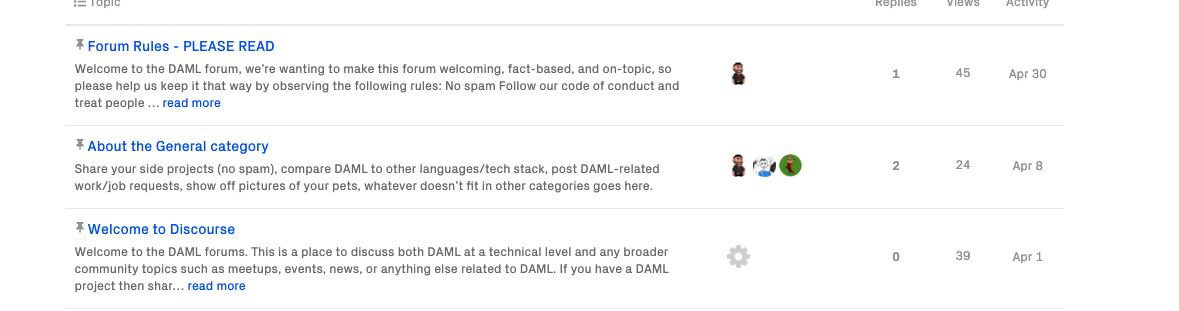
Could we have those categories merged in 1 only? I have to scroll half of the screen before I am getting to the actual posts.
 andreolf:
Could we have those categories merged in 1 only? I have to scroll half of the screen before I am getting to the actual posts.
Good idea
I un-pinned some topics. Hope this helps.
Can we put a strikethrough when something is formatted with <del>?
If I utilize use <ins> and <del> to signify “not this, but that”, it shows up in green and red, as I’d expect, but it’s not clear enough to me. Striking it through would make sure that people don’t read the sentence as if both words are present.
Compare:
In DAML,
monadsactions are the best.
And:
In DAML,
actions are the best.monads
I believe the relevant CSS is text-decoration: strikethrough.
Great idea, updated.
Well, now my post looks stupid. 
Thank you!
I get tripped quite often by the fact that code samples are limited in vertical size but show no scrollbar when there is more to see.
Assuming I’m not the only one, would it be possible to either display a scrollbar or not limit the vertical size? After all, we do not limit the vertical size of other texts.

I’m going to hazard a guess here that you use MacOS, have left your Scrollbar settings on default, and are using a trackpad.

Under those circumstances, MacOS hides scroll bars, which is a bit of a pet peeve of mine. It’s possible to force the issue using CSS, I think, but from my vague memory of the same issue int he docs, there are other downsides to this. Not giving them a max-height, might be the better idea.
bernhard:Not giving them a max-height, might be the better idea.
A lack of a max-height might make reading some threads a bit cumbersome. We also wouldn’t be able to unset max-width because of the UI elements it would either collide with or push off the screen.
Limiting width is not an issue for readability as far as I’m concerned; it’s usually very obvious when something gets cut mid-line. It’s not always so obvious that there are more lines though, so limiting height is annoying.
Fair point, made the change, let me know what you think.
Thanks!
These were great ideas, I just went through the entire thread, well done Team.
I wanted to ask about line-wrap, I’ve noticed that in the preview pane while composing a post, a line will soft-wrap at the end of the viewing UI, yet when you [Reply], it publishes with a horrendous (In my mind) left justified wrap. Which will often give you a wrap of 3 complete lines, then a single word on the 4th line, which is uncool styling IMHO.
Is it possible to text-align: justify on the non-code text?
 quidagis:
Is it possible to
text-align: justifyon the non-code text?
Thanks for the suggestion. I’m partial to left-justifying text and it’s the most common layout I encounter but if there’s strong support for fully justifying it then we can definitely consider it.
Justified text is better for readability when you have a good word-splitting algorithm. It can be a bit clunky when you don’t, yielding distracting spacing patterns in some texts. It’s worth a try, but generally speaking browsers don’t do a very good job of it unfortunately.
I’m gonna try it out on my experimental theme and report back after a week

Is definitely a balance, since the non-code UI elements seem to be far narrow than the left, viewable UI panel
| ----------------------------------------------------- | ← UI panel
| --------------------------------------| ← non-code elements
| ----------------------------------------------------- | ← Code elements
… as Gary said, with the browsers not supporting this correctly, maybe you are never going to get a good solution.
As a tip, when hacking around CSS elements that position by absolute, overlay or auto, I assign all the relevant elements, a different background colour.
Makes it so much faster to “see” the differences.
On a post I just made today, the line-wrap is horrendous:

The UI Element for the code extends far past the UI Element for non-code text. I’ll wait to see what @anthony can magically fix.

Hard to know what it may or may not break elsewhere, though.
A CSS rule walks into a bar. In another bar, a stool falls over.
/me rofl 
 Gary_Verhaegen:
Hard to know what it may or may not break elsewhere, though.
This is what I’m afraid of. May adapt a bit, iffy about scaling font sizes.
quidagis:The UI Element for the code extends far past the UI Element for non-code text
I think this is desirable, text is easier to follow with your eyes when it’s narrower, code needs to be allotted more space as one “idea” in a line of code tends to be a bit longer.
Happy to be overruled though, what’s everyone else’s thoughts on this?
Option A:

Option B:
- Option A
- Option B
 anthony:
I think this is desirable, text is easier to follow with your eyes when it’s narrower, code needs to be allotted more space as one “idea” in a line of code tends to be a bit longer.
The reason code is usually limited to 80 characters is because old screens used to have only 80x20 characters. The reason screens were 80 characters wide was that typography rules say you should have about 66 letters per line for optimal readability, and with a bit of arithmetic on average word length (and maybe a fondness for round numbers), that corresponds to about 80 characters when counting spaces and punctuation.
What I’m trying to say is I agree text should not expand forever, but I do think “about 80 characters” works well for both text and code.
Also note that you could have wider text without justification as well as narrower text with justification. 
To clarify history a little: screens were 80 characters wide because they were compliant with IBM punch cards, which had 80 rows (and 12 columns). So this decision goes back to 1928.
Great reference 
How we forget, that the current state of Technology is heavily influenced by those limited hardware support capabilities, in the past.
Looks like Option B (left justified) won out in the vote this time, always happy to revisit if tastes change. Will leave the vote open.
Democracy in action, although typically,
voter turnout was disappointing 