

Quickstart-finance dependencies
Hello, this may not be a specific DAML question but I wish some may help.
I would like to learn the tutorials on daml-finance and I tried to set up the tutorial with quickstart-finance template. Perhaps due to poor internet connections, I cannot complete the git download of all the dependencies. When I started over again with “./get-dependencies.sh”, every dar files I have downloaded were deleted and the process repeat again and I could not proceed to the next step on the tutorial.
Is there other ways to install or download the dependencies dar files to be used in the quickstart-finance template ? e.g download each dar file from git and install?
Hi @EllisAllison,
I’d like to help you get up and running with daml-finance. Could you first confirm that this is the project that you’re trying to run?
GitHub
GitHub - digital-asset/daml-finance-app
Contribute to digital-asset/daml-finance-app development by creating an account on GitHub.
Here is how I can get it running on my machine:
(Daml is already installed, running Ubuntu 22.04.3 LTS)
git clone https://github.com/digital-asset/daml-finance-app
cd daml-finance-app
./scripts/get-dependencies.sh
daml start
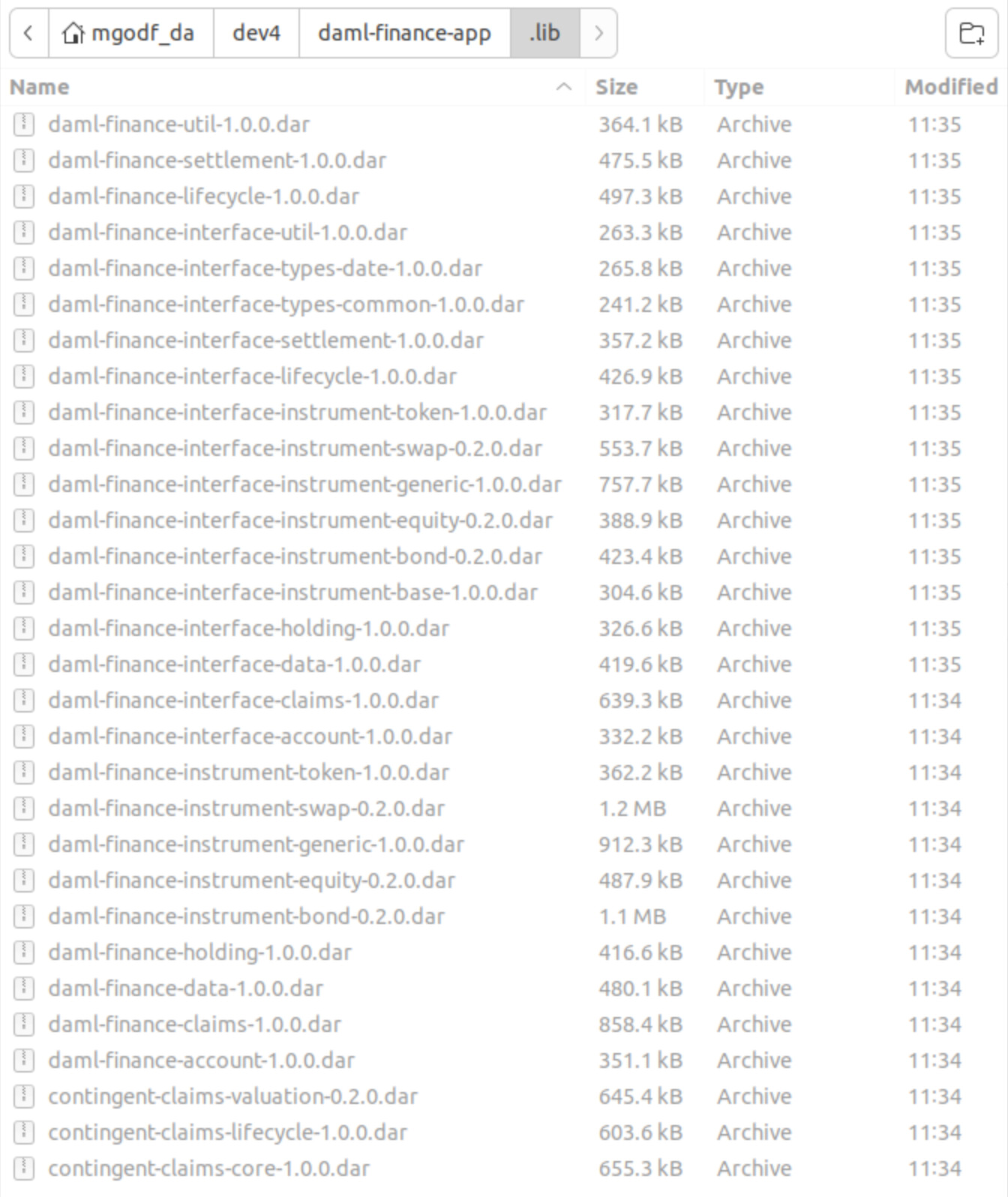
If you’re having problems due to internet connections, take a look at get-dependencies.sh. It’s just copying it’s (.dar) files directly from the daml-finance github repo.
Instead of running ./scripts/get-dependencies.sh you could,
- Download the daml-finance repo as a zip
- Create a folder called
daml-finance-app/.lib - Copy over the needed (.dar) files
- Run
daml start

Here’s what this looks like for me:
Best Regards,
Michael Godfrey
Enterprise Customer Support
Digital Asset | Creators of DAML | www.digitalasset.com
Thank you for your help.
Actually I was referring to the use of the quickstart-finance template (documentation page 620) as I was unable to download completely the dependencies files.
For the daml-finance-app you referred to, I was able to download the dependencies (after several attempts) but I encountered the following error when I “daml start” the project:
Generating fc5dc1c240b658ced7952c533f491a9738f9c764b0914ecdab121c1296f4fc60
Generating fce2ebc23688bdb6f64dc8004c4ad5b492a74ad58761f8a9c8eeb4eebbef34bf
Waiting for canton sandbox to start.
2023-11-25 08:47:13,660 [timer-utils] WARN  c.d.p.i.InMemoryStateUpdaterFlow - Package Metadata View live update did not finish in 1000ms, context: {participant: "sandbox"}
Uploading .daml/dist/daml-finance-app-0.1.5.dar to localhost:6865
An exception was thrown during the upload-dar command
- GRPCIOBadStatusCode StatusDeadlineExceeded (StatusDetails {unStatusDetails = "Deadline Exceeded"})
One reason for this to occur is if the size of DAR file being uploaded exceeds the gRPC maximum message size. The default value for this is 4Mb, but it may be increased when the ledger is (re)started. Please check with your ledger operator.

2023-11-25 08:47:30,489 [canton-env-execution-context-20] WARN  c.d.l.c.s.c.CommandTrackerFlow$ - Completion Stream failed with an error. Trying to recover in 1 second...
It seems the compiled dar file to be uploaded to canton is about 3.8M.
Hi @EllisAllison,
I think I understand, does that mean that you’re initializing the project like,
daml new quickstart-finance --template quickstart-finance
From within the quickstart-finance project could you share the output of the following two commands:
daml version

echo $(grep '^version' daml.yaml | cut -d " " -f 2)
Lastly, do you see any logs generated when you run daml start?

For reference, here is what I am running to reproduce your workflow:
daml new quickstart-finance --template quickstart-finance
cd quickstart-finance
daml start
And here is the output that I see:
2023-11-27 16:13:51.32 [INFO]  [build]
Compiling quickstart-finance to a DAR.

2023-11-27 16:13:52.58 [INFO]  [build]
Created .daml/dist/quickstart-finance-0.0.3.dar
Waiting for canton sandbox to start.
Uploading .daml/dist/quickstart-finance-0.0.3.dar to localhost:6865
DAR upload succeeded.
Running the initialization script.
Waiting for JSON API to start:
2023-11-27 16:14:14.655 [main] INFO  com.daml.http.Main - Config(ledgerHost=localhost, ledgerPort=6865, address=127.0.0.1, httpPort=7575, portFile=None, packageReloadInterval=5 seconds, packageMaxInboundMessageSize=None, maxInboundMessageSize=4194304, tlsConfig=TlsConfiguration(false,None,None,None,None,REQUIRE,false,None), jdbcConfig=None, staticContentConfig=None, allowNonHttps=true, wsConfig=None, nonRepudiationCertificateFile=None, nonRepudiationPrivateKeyFile=None, nonRepudiationPrivateKeyAlgorithm=None, surrogateTpIdCacheMaxEntries=None), context: {instance_uuid: "fdd2dba4-b253-4aab-a408-3b74830a03fb"}
2023-11-27 16:14:14.872 [http-json-ledger-api-akka.actor.default-dispatcher-4] INFO  akka.event.slf4j.Slf4jLogger - Slf4jLogger started
2023-11-27 16:14:15.123 [http-json-ledger-api-akka.actor.default-dispatcher-16] INFO  com.daml.http.HttpService - HTTP Server pre-startup, context: {instance_uuid: "fdd2dba4-b253-4aab-a408-3b74830a03fb"}
2023-11-27 16:14:15.263 [http-json-ledger-api-akka.actor.default-dispatcher-16] INFO  com.daml.http.LedgerClient - Attempting to connect to the ledger localhost:6865 (600 attempts), context: {instance_uuid: "fdd2dba4-b253-4aab-a408-3b74830a03fb"}
2023-11-27 16:14:15.523 [http-json-ledger-api-akka.actor.default-dispatcher-16] INFO  com.daml.http.LedgerClient - Attempt 1/600 succeeded!, context: {instance_uuid: "fdd2dba4-b253-4aab-a408-3b74830a03fb"}
2023-11-27 16:14:15.525 [http-json-ledger-api-akka.actor.default-dispatcher-16] INFO  com.daml.http.LedgerClient - Attempting to connect to the ledger localhost:6865 (600 attempts), context: {instance_uuid: "fdd2dba4-b253-4aab-a408-3b74830a03fb"}
2023-11-27 16:14:15.528 [http-json-ledger-api-akka.actor.default-dispatcher-16] INFO  com.daml.http.LedgerClient - Attempt 1/600 succeeded!, context: {instance_uuid: "fdd2dba4-b253-4aab-a408-3b74830a03fb"}
2023-11-27 16:14:15.529 [http-json-ledger-api-akka.actor.default-dispatcher-16] INFO  com.daml.http.HttpService - contractDao: None, context: {instance_uuid: "fdd2dba4-b253-4aab-a408-3b74830a03fb"}
2023-11-27 16:14:16.006 [http-json-ledger-api-akka.actor.default-dispatcher-17] INFO  com.daml.http.Main - Started server: (ServerBinding(/127.0.0.1:7575),None), context: {instance_uuid: "fdd2dba4-b253-4aab-a408-3b74830a03fb"}
2023-11-27 16:14:16.270 [http-json-ledger-api-akka.actor.default-dispatcher-16] INFO  com.daml.http.Endpoints - Incoming GET request on http://localhost:7575/readyz from unknown, context: {instance_uuid: "fdd2dba4-b253-4aab-a408-3b74830a03fb", request_id: "18c0b3a5-caab-4b65-9893-ef3f4035e3d9"}
2023-11-27 16:14:16.277 [http-json-ledger-api-akka.actor.default-dispatcher-17] INFO  com.daml.http.Endpoints - Responding to client with HTTP 200 OK, context: {instance_uuid: "fdd2dba4-b253-4aab-a408-3b74830a03fb", request_id: "18c0b3a5-caab-4b65-9893-ef3f4035e3d9"}
.....
Press 'r' to re-build and upload the package to the sandbox.
Press 'Ctrl-C' to quit.
Best Regards,
Michael Godfrey
Enterprise Customer Support
Digital Asset | Creators of DAML | www.digitalasset.com
I can now reproduce what you have shown me. Thank you.
The QuickStart-finance is a good template to learn the daml-finance tutorial. But as a non-programmer, I am also wondering how I can develop a simple React UI on this like the “create-daml-app” template. I wish I could have a simple UI to show the asset holdings and transfers etc. Is there any example available?
Hi @EllisAllison,
The Daml Finance Demo App that @mgodf89 mentioned earlier in the thread provides an example of a React UI built on top of Daml Finance.
It is unfortunately overall a rather complex UI, but the Custody tab gives an overview of current asset holdings.
Another starting point is the Wallet Sample App. It is unfortunately not yet based on Daml Finance, but provides a good starting point and can be extended to use Daml Finance under the hood.
Thanks,
Matteo